How to Use GLM with Claude Code, Cursor, OpenCode, and OpenClaw
If you searched for GLM Claude Code setup, GLM Cursor API base URL, or GLM OpenClaw config, start here: GLM supports a wide tool surface, but the cleanest setup path is always route first, tool second. Open DevPack, use Coding Tool Helper when possible, then copy the exact settings from the tool page you actually use.
- The strongest public setup pages are DevPack Overview, Coding Tool Helper, Claude Code, Cursor, OpenCode, OpenClaw, and the GLM-5.1 coding-agent guide.
- GLM setup is easier when you start from the route and tool, not from one copied base URL.
- Coding Plan and general API billing still need to stay separate in your setup article.
If you only open one GLM page first, make it DevPack
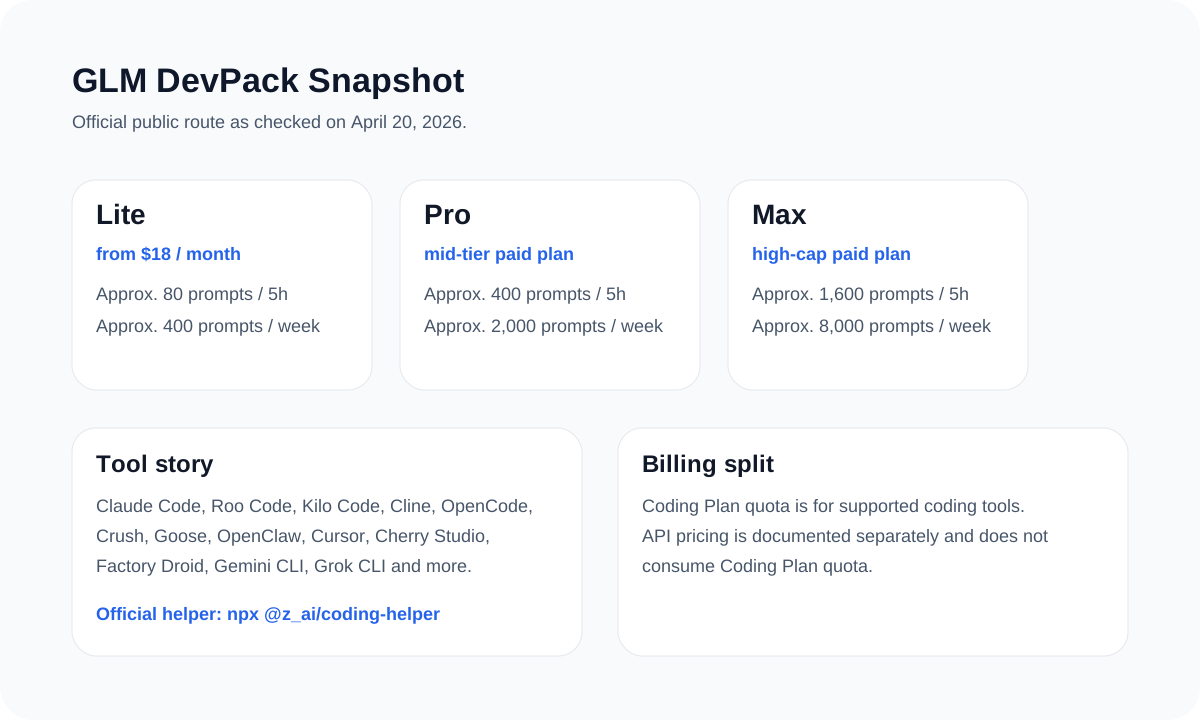
The DevPack overview tells you which tools are officially covered and which pages go deeper. That is the right starting point because it keeps the guide tied to the current product route instead of to one stale environment-variable snippet copied from a forum post.
Readers usually do not need more config. They need the right config for the exact tool they use. DevPack is what gets them there fastest.
| Tool or page | What it gives you | When to open it |
|---|---|---|
| Coding Tool Helper | The fastest official starting point | When you do not already have a fixed client |
| Claude Code | Anthropic-compatible route and manual overrides | When Claude Code is your main workflow |
| Cursor | OpenAI-compatible model and base URL override flow | When you want GLM in a Cursor setup |
| OpenCode | Provider picker and login path | When you want a local, terminal-friendly editor flow |
| OpenClaw | Provider setup path and model selection | When you want agent-heavy workflows |
| GLM-5.1 coding-agent guide | The cleanest public config example for custom GLM-5.1 use | When you need a reusable config block |
The settings that matter most
The strongest public example for a custom GLM-5.1 route uses the coding endpoint `https://api.z.ai/api/coding/paas/v4`. Claude Code can also use the Anthropic-compatible route with `https://api.z.ai/api/anthropic`.
{
  "$schema": "https://opencode.ai/config.json",
  "provider": {
    "zai": {
      "name": "z.ai",
      "npm": "@ai-sdk/openai-compatible",
      "options": {
        "baseURL": "https://api.z.ai/api/coding/paas/v4",
        "apiKey": "YOUR_ZAI_API_KEY"
      },
      "models": {
        "glm-5.1": {
          "name": "glm-5.1"
        }
      }
    }
  }
}{
"env": {
"ANTHROPIC_AUTH_TOKEN": "YOUR_ZAI_API_KEY",
"ANTHROPIC_BASE_URL": "https://api.z.ai/api/anthropic",
"API_TIMEOUT_MS": "3000000",
"ANTHROPIC_DEFAULT_SONNET_MODEL": "glm-5.1",
"ANTHROPIC_DEFAULT_OPUS_MODEL": "glm-5.1"
}
}The shortest correct setup path by tool
Claude Code
Use Coding Tool Helper first if you want the safest start. If you configure manually, point Claude Code to the Anthropic-compatible GLM route and set the model explicitly.
Cursor
Use the OpenAI protocol, override the base URL to the GLM coding endpoint, and add the exact model you want instead of relying on defaults.
OpenCode
Use `opencode auth login`, pick the Z.AI route, then switch models inside OpenCode if needed.
OpenClaw
Run the onboarding flow, pick Z.AI, then select the correct auth route. Use the GLM-5.1 guide if you need a custom model block.
What people get wrong
- They mix Coding Plan usage with general API billing.
- They assume every supported tool has the same depth of documentation.
- They describe GLM as a standalone CLI product instead of a supported-tool route.
- They copy third-party snippets before opening the current official tool page.
Start with the official helper or the exact tool page
That is the fastest way to get a setup guide that stays accurate instead of aging into a pastebin of stale config.
Sources and official links
Frequently asked questions
What is the best first GLM setup page to open?
DevPack Overview. It tells you the current route and points you to the right tool page.
Where is the strongest public GLM-5.1 config example?
The GLM-5.1 coding-agent guide is still the cleanest public source for a reusable config block.
Can every GLM-supported tool be covered with the same level of detail?
No. The support list is broad, but the depth of public setup docs still varies by tool.