GLM vs Kimi vs MiniMax for Coding: Which One Fits Your Workflow?
If you searched for GLM vs Kimi vs MiniMax, the useful comparison is not “which model is best” in the abstract. It is which route fits the way you work: GLM for a simpler coding subscription, Kimi for a clear split between coding product and API platform, and MiniMax for the cleanest public plan table.
- These three providers do not package access in the same way, so price alone is a bad first comparison.
- GLM is the clearest coding-subscription story, Kimi is the clearest dual-route story, and MiniMax is the clearest public plan-table story.
- The strongest comparison is route first, cost unit second, tool support third.
The route map readers need before any price comparison
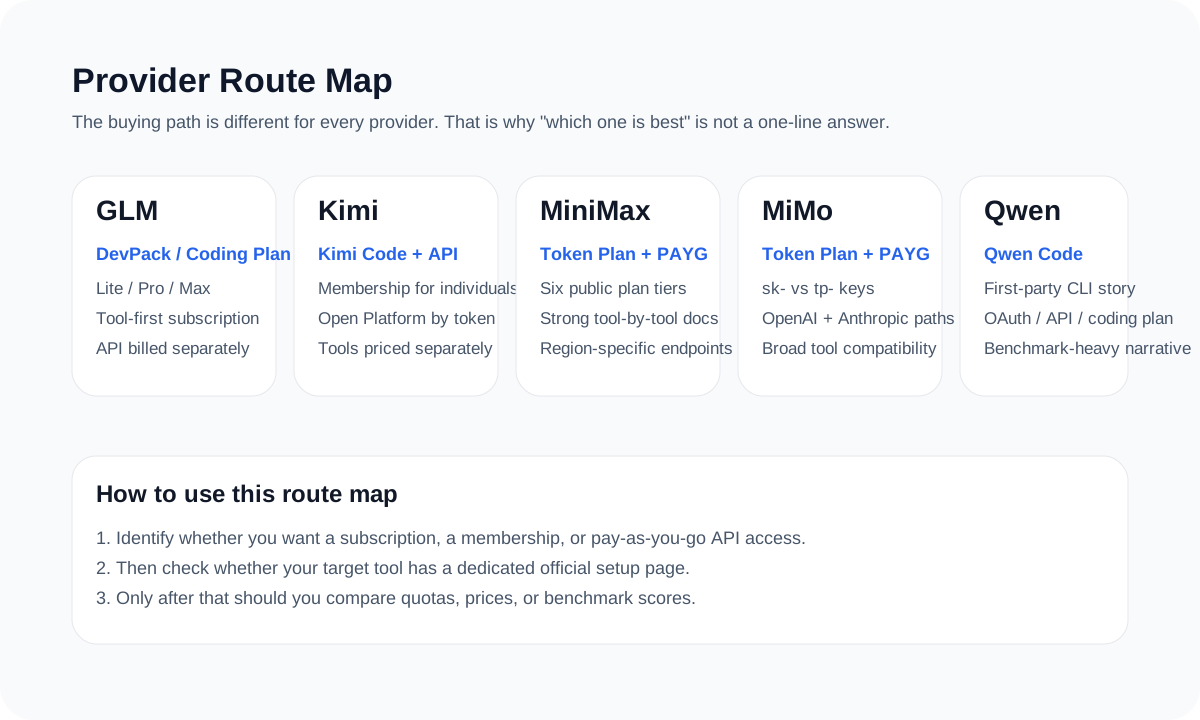
A weak comparison article starts with prices. A strong comparison article starts with what each provider is actually selling. GLM sells a clearer coding-plan subscription route. Kimi splits between Kimi Code and Moonshot Open Platform. MiniMax splits between Token Plan and PAYG.
Once readers see that structure, the rest of the comparison gets much easier. Without it, every price table on the page feels more authoritative than it really is.

Official screenshot
Kimi Code is presented as a membership-style coding product
The official Kimi Code page frames the route around coding workflows, official clients, and membership access rather than raw token billing.
- Useful for readers searching for Kimi Code plans, Kimi CLI, or Kimi Code membership.
- A strong visual reminder that Kimi Code and Moonshot Open Platform are different routes.
Source: Kimi Code page.

Official screenshot
MiniMax publishes a strong public pricing table for monthly and Highspeed tiers
This pricing-table view is one of the best official screenshots in the category because readers can verify standard and Highspeed tiers directly from the source page.
- Shows the monthly standard tiers and the Highspeed plan table in one view.
- A good visual checkpoint before repeating plan prices or 5-hour request limits in an article.
Source: MiniMax Token Plan pricing.
| Provider | Best first page | Core structure | Biggest reader mistake |
|---|---|---|---|
| GLM | Subscription page + DevPack overview | Coding Plan subscription plus separate API billing | Treating the plan as API credit |
| Kimi | Kimi Code docs or K2.5 pricing page | Consumer coding product plus API platform | Treating those as one bill and one key |
| MiniMax | Token Plan overview + pricing overview | Token Plan subscription plus PAYG | Mixing current Token Plan with older Coding Plan pages |
How the pricing conversation differs
GLM publishes plan usage and MCP quotas well. Kimi publishes API token pricing and tool costs clearly, while Kimi Code membership pricing needs to be checked on the current plan page. MiniMax publishes the cleanest full plan table, which makes it easier to cover package pricing directly.
| Provider | Best public pricing signal | What should still be checked live |
|---|---|---|
| GLM | Prompt limits, weekly caps, MCP quotas, Lite starting price | Current Pro and Max live pricing |
| Kimi | K2.5 token pricing and tool pricing | Current Kimi Code membership pricing |
| MiniMax | Token Plan tier table and PAYG price table | Route selection and live availability |
Which provider fits which kind of user
That route-first framing is usually more useful to readers than another generic “best model” opinion.
| If the reader wants... | Start with... | Why |
|---|---|---|
| A clean subscription route for supported coding tools | GLM | It is the easiest subscription-style path to explain |
| An official coding product plus a separate API path | Kimi | It cleanly serves both personal coding and platform use cases |
| The clearest public plan table and broad multimodal value | MiniMax | The public package structure is unusually transparent |
Pick the route first, then compare price inside that route
That one rule keeps GLM vs Kimi vs MiniMax coverage much clearer for actual buyers.
Sources and official links
Frequently asked questions
Which is best overall: GLM, Kimi, or MiniMax?
There is no honest universal winner. The right answer depends on whether the reader wants a subscription route, a dual product/API route, or the clearest public package table.
Why is it a mistake to compare these three by price alone?
Because they expose different cost units and different product structures. Prompts, requests, token prices, and subscription fees are not directly interchangeable.
What should a good public comparison article emphasize first?
It should emphasize what route the user is actually trying to buy before it compares pricing.