How to Set Up MiniMax in Claude Code, Cursor, OpenCode, and CLI
If you searched for MiniMax Claude Code setup, MiniMax Cursor base URL, or MiniMax CLI login, the main thing to know is this: MiniMax’s docs are unusually complete, but you still need to match Token Plan vs PAYG and `minimax.io` vs `minimaxi.com` correctly or the whole setup falls apart.
- MiniMax has official pages for Claude Code, Cursor, OpenCode, and MiniMax CLI.
- The biggest setup split is not the model name. It is Token Plan vs PAYG and `minimax.io` vs `minimaxi.com`.
- The default model string you will see most often in official tool docs is `MiniMax-M2.7`.
Why MiniMax is one of the easiest providers to set up well
MiniMax is one of the easiest providers to cover in a public setup article because the official docs are already organized by tool. You do not have to reverse-engineer one generic page into four separate tutorials. Claude Code, Cursor, OpenCode, and MiniMax CLI all have their own official paths.
That makes MiniMax especially strong for search terms like “MiniMax Claude Code setup” or “MiniMax Cursor API base URL.” The answer is usually already on the official site. What readers still need is help connecting those pages and avoiding the few mistakes that actually break the setup.

Official screenshot
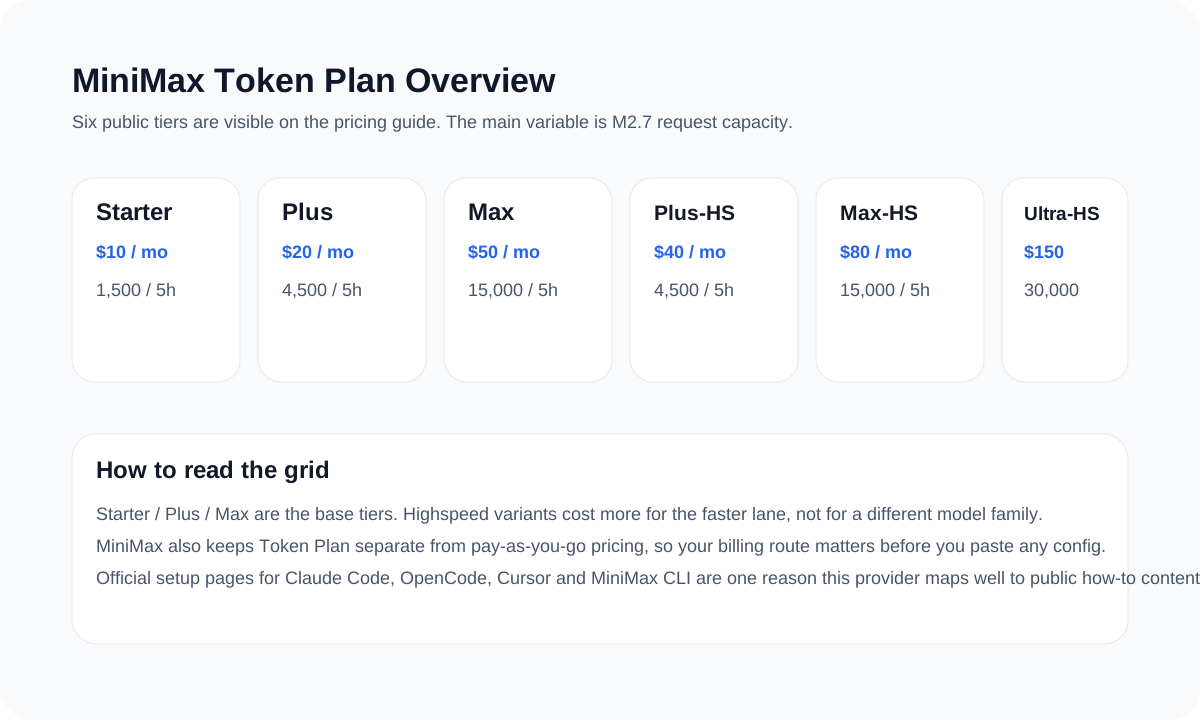
MiniMax clearly positions Token Plan as the current subscription route
The official Token Plan overview is the best first stop for public-facing articles because it explains the route before readers ever hit a pricing table.
- Useful for queries around MiniMax Token Plan, MiniMax Coding Plan, and MiniMax subscription.
- Helps clarify that Token Plan is the current public route readers should treat as primary.
Source: MiniMax Token Plan overview.

Official screenshot
MiniMax documents OpenClaw as a Token Plan workflow, not just a generic compatibility claim
The provider page helps readers see that “supports OpenClaw” still means a specific plan, setup path, and model route.
- Useful for articles comparing OpenClaw support depth, not just support existence.
- Shows that MiniMax pairs provider support with a dedicated integration page.
Source: MiniMax OpenClaw page.
Which MiniMax doc covers which workflow
| Workflow | Protocol or route | What the official page gives you | What to watch out for |
|---|---|---|---|
| Claude Code | Anthropic-compatible | The correct Anthropic base URL and model mapping | Clear old Anthropic env vars before switching providers |
| Cursor | OpenAI-compatible | The correct base URL override path and model name | Do not use the Anthropic endpoint inside Cursor |
| OpenCode | Provider login or manual config | An official provider flow plus a manual config option | Do not mix region endpoints |
| MiniMax CLI | First-party CLI | The cleanest native command-line path | Make sure you are logging in with the correct key for the route you chose |
Claude Code, Cursor, OpenCode, and MiniMax CLI quick setup
Claude Code
Use the Anthropic-compatible endpoint. For the international route, the public doc uses `https://api.minimax.io/anthropic`. For China, use `https://api.minimaxi.com/anthropic`. Set the model to `MiniMax-M2.7` unless the official page for your route says otherwise.
Cursor
Use the OpenAI-compatible path and override the base URL. For the international route, use `https://api.minimax.io/v1`. For China, use `https://api.minimaxi.com/v1`. Add the model manually as `MiniMax-M2.7`.
OpenCode
If you want the fastest path, use `opencode auth login` and choose MiniMax as the provider. If you prefer to document manual config, stay on the exact route and endpoint shown in the official OpenCode page.
MiniMax CLI
If the reader wants the cleanest native CLI path, this is it. Install the CLI, then log in with your MiniMax API key.
{
  "env": {
    "ANTHROPIC_BASE_URL": "https://api.minimax.io/anthropic",
    "ANTHROPIC_AUTH_TOKEN": "<MINIMAX_API_KEY>",
    "API_TIMEOUT_MS": "3000000",
    "ANTHROPIC_MODEL": "MiniMax-M2.7",
    "ANTHROPIC_DEFAULT_SONNET_MODEL": "MiniMax-M2.7",
    "ANTHROPIC_DEFAULT_OPUS_MODEL": "MiniMax-M2.7"
  }
}npm install -g mmx-cli
mmx auth login --api-key sk-xxxxxThe mistakes that waste the most time
- Mixing Token Plan and PAYG instructions in one setup flow.
- Using `minimax.io` and `minimaxi.com` endpoints interchangeably.
- Trying to use the Anthropic endpoint in Cursor or the OpenAI endpoint in Claude Code.
- Writing “MiniMax works everywhere the same way” when the route still depends on tool and region.
Pick the tool first, then copy the endpoint from that exact page
That simple workflow usually keeps MiniMax setup articles accurate and much easier to follow.
Sources and official links
Frequently asked questions
Does MiniMax have an official Cursor setup page?
Yes. The current MiniMax docs publish a dedicated Cursor page under the Token Plan documentation.
What model name should I use in most MiniMax tool setups?
The official docs most often point readers to `MiniMax-M2.7` for current coding workflows.
Why is MiniMax especially useful for public setup articles?
Because the pricing, plan, and per-tool docs are already structured in a way that maps cleanly to user search intent.